
Custom CRM development in India for teams that sell on the phone
We do custom CRM development in India for businesses whose leads come from forms, ads, calls and WhatsApp. Every lead gets an owner, a next step and a reminder, and you see which ones turn into sales.

Where leads get lost
Leads scattered everywhere
Enquiries arrive from your website, ad campaigns, lead portals and WhatsApp, and many never reach a spreadsheet.
Follow-ups depend on memory
Telecallers call back when they remember. Nobody knows which leads went cold, or why.
Calls you can't review
No manager can listen to hundreds of calls, so you don’t know what your team promises customers or where deals slip.
A CRM that doesn't fit
Large off-the-shelf CRMs bring screens you never use and miss the steps you do, so the team drifts back to Excel.
What you get
Lead capture from every source
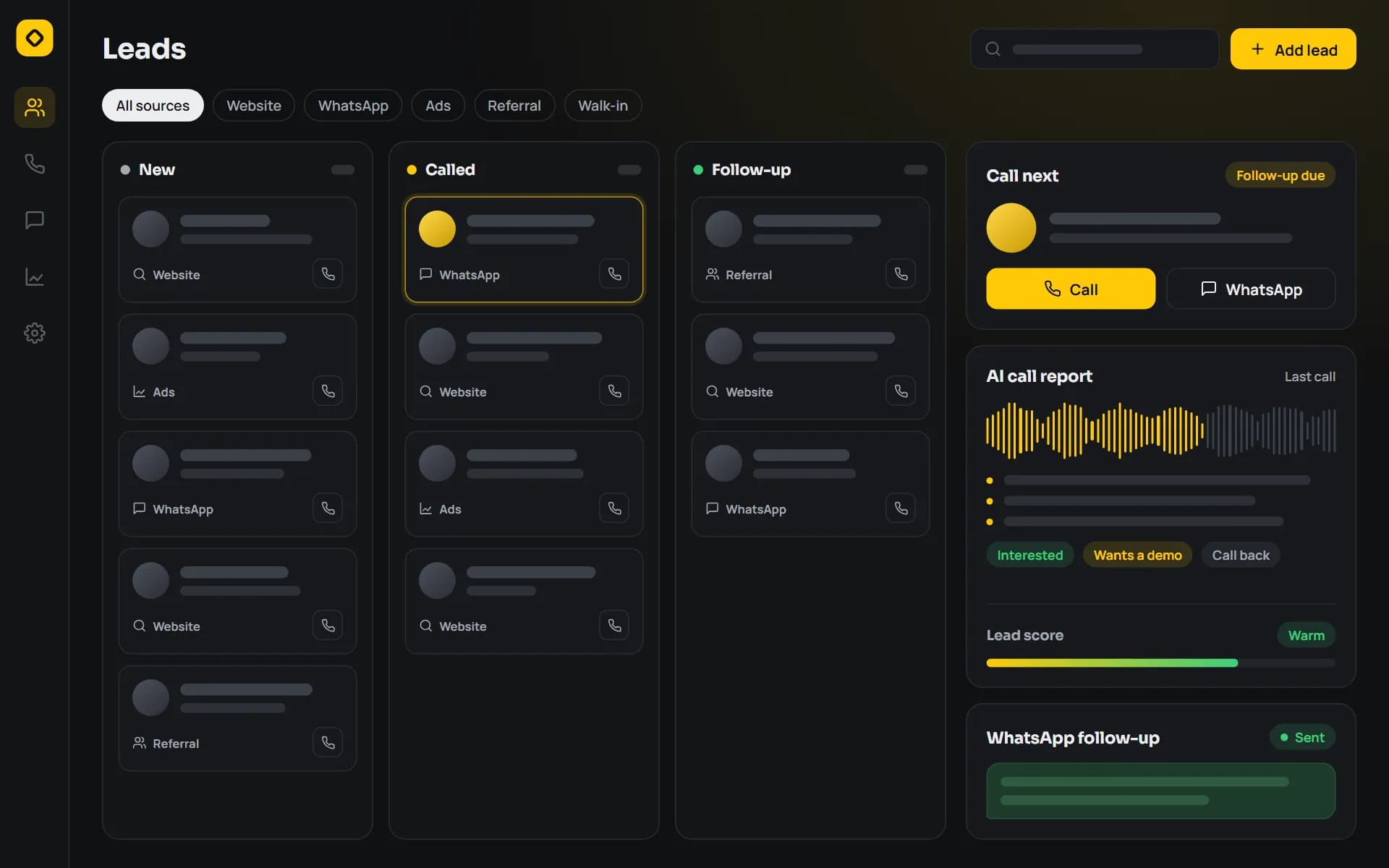
Website forms, ad leads, missed calls and WhatsApp messages land in one list, with duplicates merged.
Assignment and follow-up rules
Leads go to the right person by product, city or language, with due dates and reminders so none sit idle.
Telecaller dashboard
Each caller sees today’s calls, history and next actions. Managers see the whole team’s progress.
AI call-analysis reports
Recorded calls are transcribed and summarised, with flags for objections, missed follow-ups and promises made.
WhatsApp follow-ups
Approved templates for reminders, quotes and payment links, sent from inside the CRM through the WhatsApp Business API.
Source and pipeline reports
See which source, campaign and caller turns leads into revenue, not just activity.
How we build it
Step 1: Map your sales flow
We follow a lead from first enquiry to payment and write down every step, status and handover.
Step 2: Design the screens
Telecaller, manager and owner views are designed around the few actions each person repeats all day.
Step 3: Build and connect
We build the CRM and connect your lead sources, telephony and WhatsApp account.
Step 4: Launch with your team
We import existing leads, train callers and adjust the rules during the first weeks of real use.
Step 5: Improve
Reports and automations grow as you learn which sources and scripts work.
What we build with
- GoAPIs, call processing and background jobs
- Next.jsTelecaller, manager and owner dashboards
- PostgreSQLLeads, calls and full activity history
- React NativeMobile app for field sales and call logging
- WhatsApp Business APIOfficial channel for templates and replies
- DockerRepeatable deployments on any server
Ready-made option
Start with our ready CRM
Our CRM already does lead capture, a telecaller dashboard, AI call-analysis reports and WhatsApp follow-ups. You can start there, and we customise only what’s missing.
Questions about custom CRM
Why build a custom CRM instead of using a ready one?
Ready CRMs work well when your sales process is standard. A custom CRM fits your own lead sources, stages, incentive rules and reports, and you don’t pay for features nobody uses. If our ready CRM fits, we will suggest that first.
How much does a custom CRM cost?
It depends on your lead sources, the number of users, call recording, WhatsApp and the reports you need. We share a written scope and quote after a free consultation.
How does AI call analysis work?
Call recordings are turned into text, and an AI model summarises each call, notes objections and next steps, and flags calls a manager should hear. Managers read short reports instead of listening to every call.
Can the CRM send WhatsApp messages?
Yes, through the official WhatsApp Business API, using message templates approved by WhatsApp. Messages and replies are saved against the lead, so the whole conversation stays in one place.
Can you import our existing leads from Excel or another CRM?
Yes. We clean and import your leads, notes and statuses, so your team starts with the full history.
Will it work with our phone system?
Many cloud telephony and IVR providers offer an API, and we connect the CRM to it for click-to-call and call recordings. If your team calls from their own phones, an Android app can log the calls instead.
Show us how your leads come in
Bring a sample of your lead sheet to a free consultation. We’ll show you where leads drop and what a CRM would change.