
Car showroom with 3D car configurator template
Automotive · Website · 3D, interactive
A car dealership website with a 3D car the visitor can turn and repaint, alloy and variant choices, an on-road price breakup, an EMI calculator and test drive booking.
What this template is for
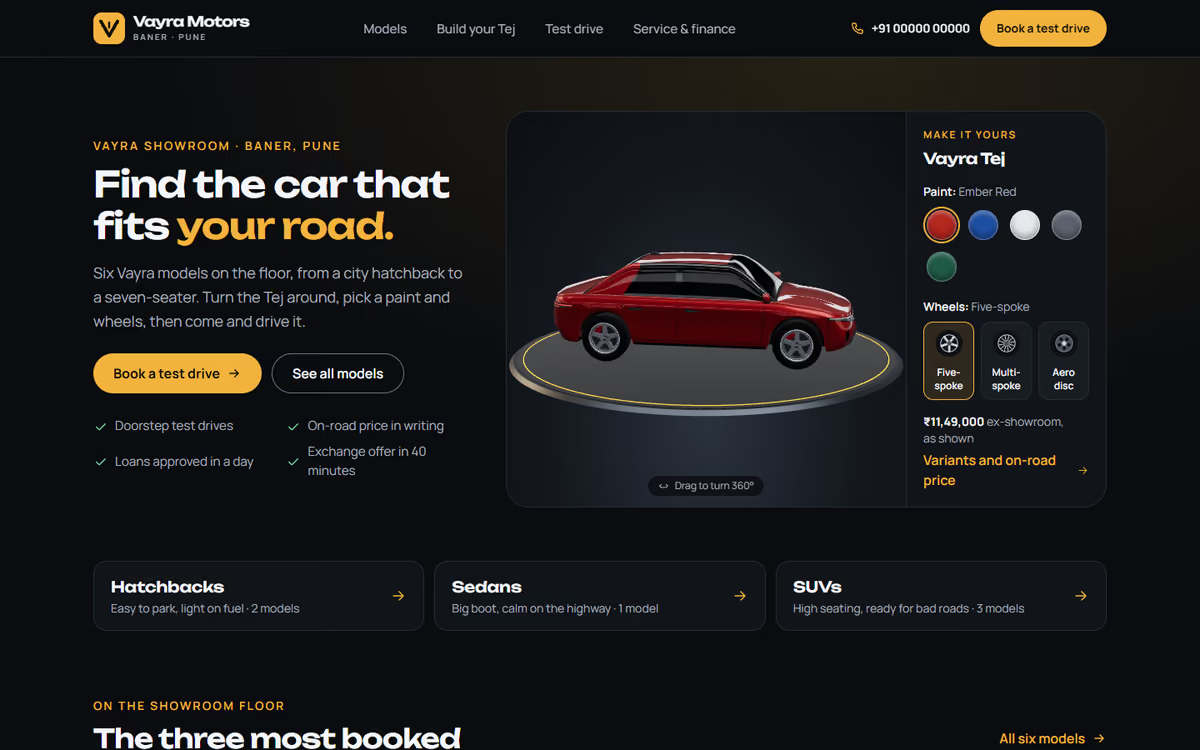
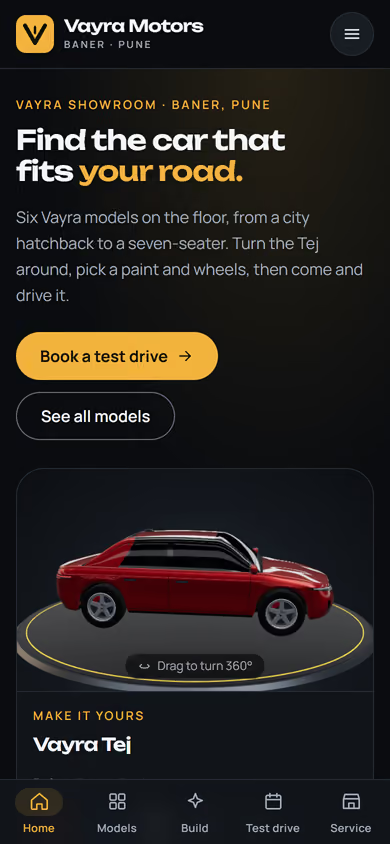
This car showroom website template is for dealerships that want buyers to explore a car properly before they visit. The hero is a car in real 3D: the visitor turns it all the way round, repaints it in five colours and switches between three alloy wheel styles. It ships with a fictional Pune dealership and made-up car models, with no real brands or logos, so you can click through every page first.
The template has five pages:
- Home: the 3D car, the model range and ways to reach the showroom.
- Models: hatchbacks, sedans and SUVs, with filters for body type, fuel and budget.
- Build and price: the 3D configurator with paint, wheels and variant, features and specifications, the on-road price broken into ex-showroom, RTO and insurance, and an EMI calculator.
- Book a test drive: a booking form for the model the customer wants to try.
- Service and finance: what the service centre and finance desk offer, with showroom and service hours.
The 3D runs in the browser with no app or plug-in. Paint and alloy choices that cost extra are added to the price as the customer picks them. The design is dark and premium, and on phones a tab bar at the bottom keeps all five pages one tap away.
The static version uses sample models and prices. When we make it dynamic, your models, variants and prices come from an admin panel, the on-road price uses your own RTO and insurance rates, test drive and service requests go to your CRM with a WhatsApp alert, and you can take booking amounts by UPI.
Pages included
- HomeView Home
- ModelsView Models
- Vayra Tej: build and priceView Vayra Tej: build and price
- Book a test driveView Book a test drive
- Service and financeView Service and finance
Features
- Real 3D car the visitor can turn all the way round
- Five paint colours and three alloy wheel styles
- Three variants (Pure, Plus, Signature) with their feature lists
- On-road price breakup: ex-showroom, RTO and insurance
- EMI calculator on the model page
- Model listing with body type, fuel and budget filters
- Test drive booking form, with a bottom tab bar on phones
Static template or dynamic site?
- Admin panel to add models, variants, colours and prices yourself
- On-road prices calculated from your own RTO and insurance rates
- Test drive and service requests saved to your CRM, with WhatsApp alerts
- Razorpay / UPI booking amounts
- Real database with daily backups
- Full SEO setup and a blog
| Feature | Static template | Dynamic (we build it) |
|---|---|---|
| Content edits | Developer edits code | Admin panel — you edit it yourself |
| Login / users | — | ✓ |
| Forms | Email only | Saved to your CRM, WhatsApp alerts |
| Payments | — | Razorpay / UPI |
| Data | Sample data | Your real data, database and backups |
| SEO | Basic | Full SEO setup and a blog |
Questions about templates
What is the difference between a static and a dynamic template?
A static template is a ready-made design with sample content: it looks finished, but a developer has to edit the code to change anything. A dynamic version is one we build for you, with an admin panel to edit content yourself, logins, forms saved to your CRM with WhatsApp alerts, Razorpay or UPI payments, your real data in a database with backups, and a full SEO setup with a blog.
How does “Make it dynamic” work?
Click “Make it dynamic” on the template you like, tick the extras you want (admin panel, payments, CRM, WhatsApp, SEO, custom domain) and send the form. We call you within one working day, confirm what you need and send you a written quote before any work starts.